New year resolution 2027: take supplements and vitamins regularly
Davka is an iPhone and Android app for logging supplements and vitamins by part of the day, plus water and caffeine, with widgets and PDF reports. It asks for no account, has no ads, and the first 7 days are free.
This page describes what Davka does for a resolution to log supplements and vitamins every day. It gives no advice on what or how much to take, does not rate supplements and promises no health effect: it is a record, not an advisor. Facts about Apple Health come from Apple Support and are dated 28 October 2026.
What you set up at the start
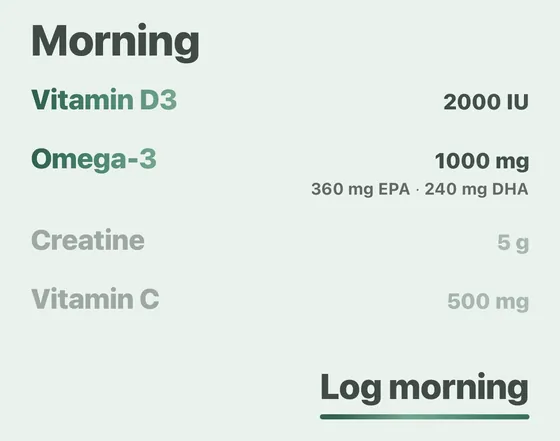
You put supplements into morning, afternoon and evening, and for each one you can set only some days of the week. The catalog has 34 supplements, and anything it lacks you add as a custom item. In Settings, in the Reminders row, you turn on reminders for each part of the day.
You name a custom item yourself, put it in a part of the day and set the days of the week; the reminders for that part of the day cover it like any catalog supplement, so Davka can log things that are not in the catalog, such as a pre-workout.
What helps you keep logging
The Home screen shows today’s supplements by part of the day and, at the top, how many are still left to log. One tap logs a whole part of the day. From the reminder notification and from the Home Screen widget you can log without opening the app. A missed day can be filled in later in the calendar.
Streaks and overviews
Insights builds overviews from your records for a week, a month, since the start or a custom period: how many days are logged, streaks without a gap and the weekdays with the most entries. A PDF report for a month, a quarter or a year and the full history as CSV are exported from Settings.
Water and caffeine next to supplements
Below the supplements the Home screen has Water and Caffeine. One tap on Water logs the preset amount and Davka tracks the daily goal; for caffeine you pick the drink and Davka estimates the caffeine curve.
Logging in Apple Health and in Davka
Apple’s iPhone guide describes logging one medication at a time: in Medications you tap its name, choose Taken or Skipped, then tap Done. Adding a supplement to Medications is, per Apple’s support article, a setup in several steps: name, type, strength, schedule, duration, shape and color. Apple’s Apple Watch guide describes logging all the medications of one scheduled time at once. In Davka you log a whole part of the day with one tap.
From the developer
I built the app because I was looking for something that would make logging supplements easier. Logging them in Apple Health felt impractical to me, so I made Davka, where I log a whole part of the day with one tap.
Where Davka is weaker
Today it has no interaction checks and cannot share records with other people. It does not scan labels. Davka gives no advice on what or how much to take; it is a record, not an advisor.
Davka and Apple Health side by side (28 October 2026)
| Davka | Apple Health (Medications) | |
|---|---|---|
| Logging supplements in two parts of the day | one tap per part of the day | one medication at a time per Apple’s iPhone guide; on Apple Watch all of one scheduled time at once |
| Reminders | by part of the day; logging from the notification and from the widget | by each medication’s schedule; logging from the notification, a second reminder after 30 minutes |
| Overview and streaks | week, month, since the start, streaks without a gap | for each medication, how often it was taken or skipped |
| PDF and export | report for a month, quarter or year, full history as CSV | PDF of the list of current medications |
| Price in the US App Store | $1.99 a month, $19.99 a year, or $39.99 once | free, part of iOS |
FAQ
Does Davka help keep a resolution to take supplements regularly?
Davka keeps a record and reminds you by part of the day: it shows what is still left to log today, counts streaks without a gap and builds overviews. It gives no advice on what or how much to take and promises nothing.
How do I remember to take my vitamins every day?
In Settings you turn on reminders for each part of the day. From the reminder notification, and from the Home Screen widget, you can log without opening the app.
How much does Davka cost?
The first 7 days are free, with no payment up front and no card details. After that you choose a subscription ($1.99 a month or $19.99 a year) or a lifetime license ($39.99, paid once). A subscription is not required: the lifetime license is one single payment.
Does Davka need an account?
No. Davka asks for no registration or sign-in and has no ads or analytics.
Can I log something that is not in the Davka catalog?
You name a custom item yourself, put it in a part of the day and set the days of the week; the reminders for that part of the day cover it like any catalog supplement, so Davka can log things that are not in the catalog, such as a pre-workout. Today it has no interaction checks and cannot share records with other people.
Which parts of the day does Davka use?
Morning (until 11:59), afternoon (12:00 to 17:59) and evening (from 18:00), plus sections you add yourself.
What happens when the trial ends?
Your records are not deleted after the trial. The app stays locked until you choose a subscription or the lifetime license, and you can download your records as CSV right from that screen.
More resolutions
New year resolutions 2027 with a log · Drink more water · Less caffeine · Drink less: Dry January
Sources
support.apple.com/en-us/105064; support.apple.com/guide/iphone/track-your-medications-iph811670c81/ios; support.apple.com/guide/watch/medications-apd3dd24d78b/watchos; apps.apple.com/us/app/id6788429833.
Davka is on the App Store and Google Play